
Game controller emulation is coming to M1 Macs
With Apple’s M1 Macs, you can download and run games made for the iPad and iPhone. The problem, though, is that iPhone and iPad game controls often don’t translate well to the Mac. Apple is making progress towards solving that problem in the latest macOS Big Sur 11.3 beta with support for game controller emulation.
First reported by MacRumors, the macOS beta has a setting in the app preferences to enable Controller Emulation, which lets you use a keyboard and mouse/touchpad combination to perform the same functions as a game controller. For example, the directional cross is mapped to the arrow keys on a keyboard, the left thumbstick is W-A-S-D, A is spacebar, and X and Y are mapped to Q and E. You can still use a game controller if you have one.
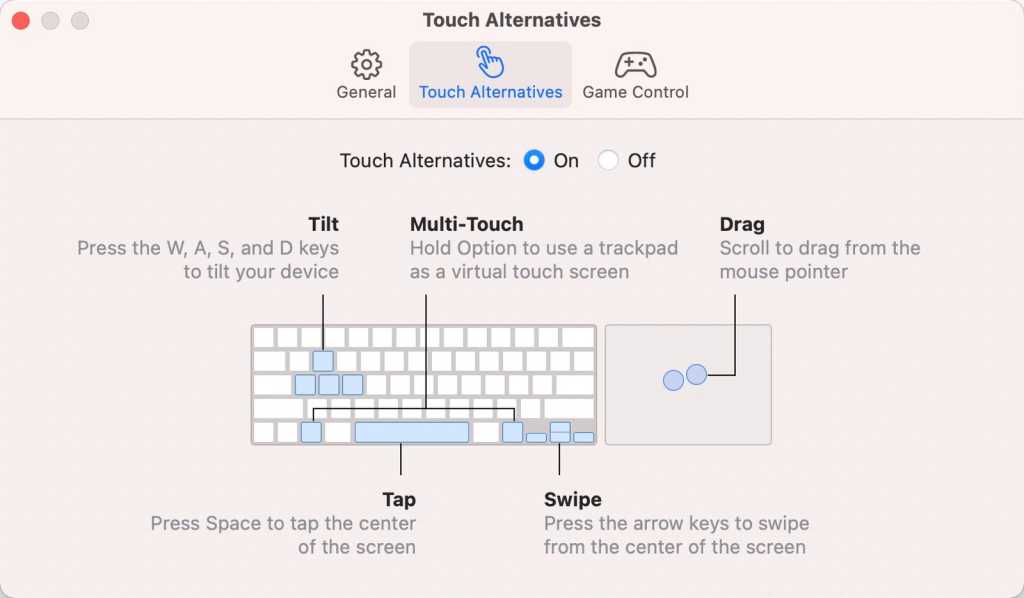
Touch Alternatives provides keyboard alternatives to touch controls you’d typically use on iPad and iPhone apps.
Apple
Apple currently has settings for Touch Alternatives, which are used in place of the touch controls you’d typically use on iPad and iPhone apps but can’t easily recreate on the Mac since they lack touchscreens. For example, the W-A-S-D keys perform a tilt, while the arrow keys perform swipes from the center of the app’s screen. Touch Alternatives are a separate set of controls from Controller Emulation and are not used at the same time.
https://www.macworld.com/index.rssGet one of the last HomePods ever for $44 offMacworld is your best source for all things Apple. We give you the scoop on what’s new, what’s best and how to make the most out of the products you love.https://www.macworld.com/wp-content/uploads/2021/03/cropped-macworld-favicon.png?w=32Technology124Roman Loyola
Powered by WPeMatico